C:\PROJECTS\PINPOINT>_
Pinpoint — Store Locator Map for Shopify
Put every one of your retail locations on an interactive map your customers can actually use — proximity search, geolocation, directions — without touching code or a Google Maps API key.
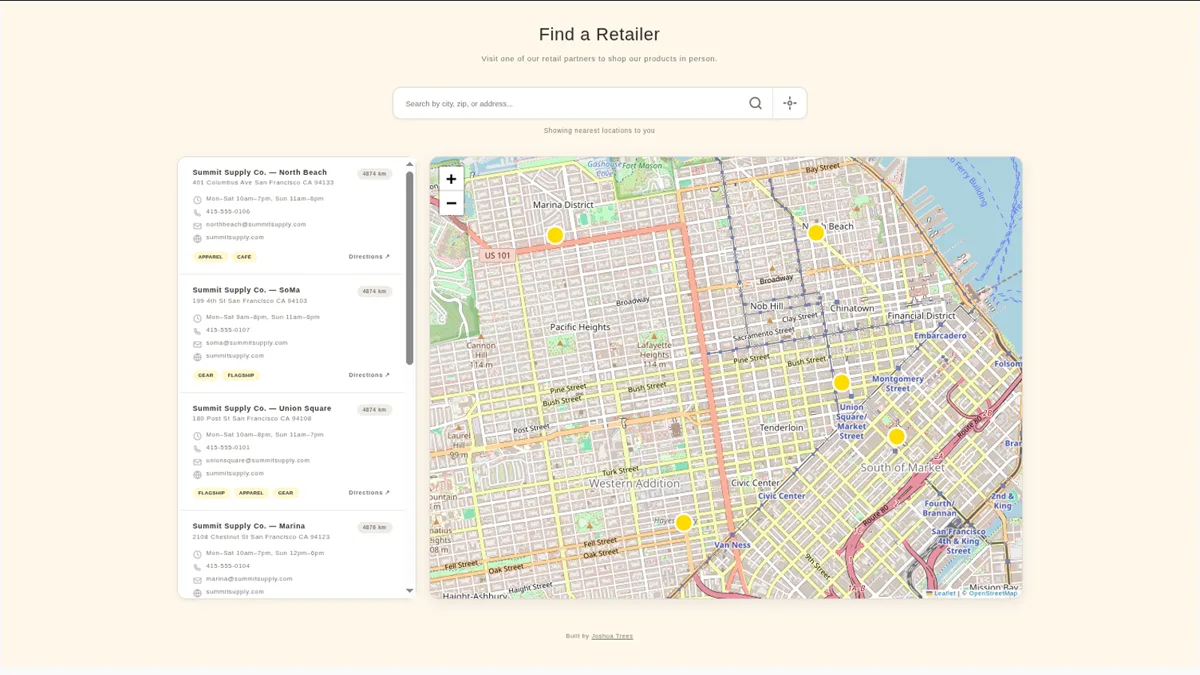
Why your Shopify store needs a store locator
If your products are sold in physical shops — your own storefronts, stockists, dealers, or wholesale partners — "where can I buy this near me?" is one of the most common questions your customers have. A store locator page answers it instantly, keeps that traffic on your site instead of losing it to a Google search, and captures local search intent that a plain contact page never will.
Whatever you call yours — a "Find a Store" page, a where-to-buy page, a dealer locator, or a stockist map — it's the same tool, and it captures the long-tail searches your product pages never will: "where to buy [your brand]", "[your brand] near me", "[your brand] dealer in [city]".
Pinpoint is a store locator app built specifically for Shopify. It lives in your theme as a native block: you add your locations in the admin, drop the block on a page in the theme editor, and your customers get a fast, mobile-friendly, searchable store map of every location you sell from.
What Pinpoint does
◎ Interactive map with proximity search
Customers search by address, city, or store name — or tap once to use geolocation and see the nearest locations sorted by distance.
◎ Rich location profiles
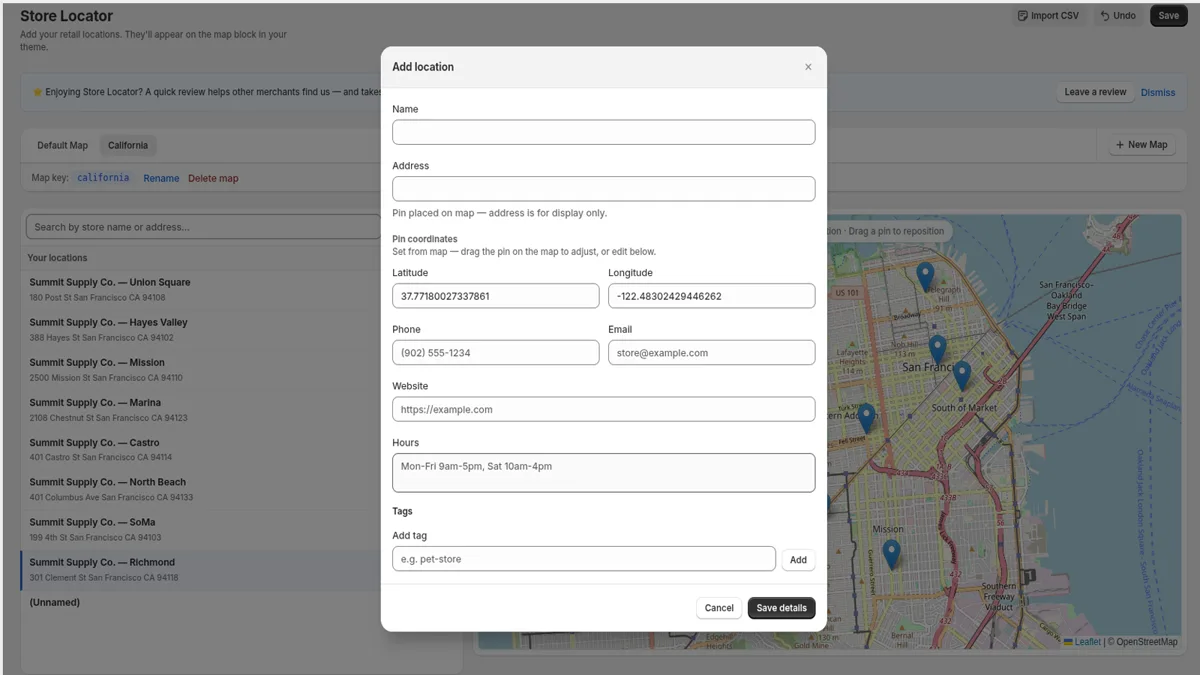
Every location can carry business hours, phone, email, website, and custom tags — plus a one-tap "Get Directions" link that opens the customer's maps app.
◎ CSV bulk import with automatic geocoding
Managing 50+ stockists? Upload a spreadsheet and Pinpoint geocodes every address for you. No manual pin-dropping.
◎ Full theme editor customization
Colors, heading, layout, map styles, custom icons, and map height are all configured in the Shopify theme editor, so the map matches your brand out of the box.
◎ No API keys, ever
Maps are powered by Leaflet.js and OpenStreetMap tiles. There's nothing to sign up for, no billing account to connect, and no per-load usage fees.
No Google Maps API key required
Most Shopify store locator apps are built on Google Maps, which means creating a Google Cloud project, generating an API key, attaching a credit card, and watching usage quotas. For a merchant who just wants a map on a page, that's a lot of ceremony — and a recurring cost risk if traffic spikes.
Pinpoint takes a different route: Leaflet.js with OpenStreetMap, the same open mapping stack used across the web — a true Google Maps alternative for your store locator. The map renders client-side in your theme, loads fast, and works the moment you install the app. Zero keys, zero quotas, zero surprise invoices.
Set up in minutes
- 01. Install Pinpoint from the Shopify App Store.
- 02. Add your locations in the admin dashboard — search an address and click, or bulk import a CSV.
- 03. Open the theme editor and add the Store Locator block to any page.
- 04. Tune colors, heading, and layout to match your theme. Done.
Pricing
Free
$0
Up to 3 locations on 1 map. Perfect for a single storefront or a small stockist list.
Essential
$4.99/mo
Unlimited locations and maps, plus CSV bulk import. 7-day free trial — a fraction of what comparable locator apps charge.
Frequently asked questions
Does Pinpoint require a Google Maps API key?
No. Pinpoint uses Leaflet.js with OpenStreetMap tiles — no API key, no connected billing account, no usage charges. Install the app, add your locations, and the map works.
How do I add a store locator to my Shopify store?
Install Pinpoint, add locations in the admin (or import a CSV with automatic geocoding), then add the Store Locator block to any page in the theme editor. No code required.
Can customers find the store nearest to them?
Yes — search by address, city, or store name, filter by tags, or use one-tap geolocation to see the closest locations sorted by distance.
Is there a free plan?
Yes: 3 locations on 1 map, free forever. Essential is $4.99/month for unlimited locations and maps plus CSV import, with a 7-day trial.
Can I use Pinpoint as a dealer locator or stockist page?
Yes — a store locator, dealer locator, stockist map, and where-to-buy page are the same tool. Custom tags let you label locations as dealers, retailers, or stockists, and customers can filter the map by them.
Will the map match my store's theme?
Yes. It's a native theme block — colors, heading, layout, and map height are all customizable in the Shopify theme editor.
Try Pinpoint free
Add a store locator map to your Shopify store today — free for up to 3 locations, 7-day trial on Essential.
Pinpoint is built and maintained by Joshua Trees — focused, thoughtful digital services from development to design.